
Bluetooth issues in a Chevy generally fall into three categories: the phone won't pair at all, it pairs but keeps disconnecting, or it stays connected but call/audio quality is poor. Each points to a different, fairly specific fix.
Jump to a section: Phone won't pair at all · Keeps disconnecting · Poor call or audio quality · Clearing paired device memory · Quick reference table · FAQ
Phone Won't Pair At All
Start by confirming Bluetooth is actually enabled on both the phone and the infotainment system, and that the phone isn't already paired to another device blocking a new connection. Deleting any old or duplicate pairing entries for that phone on both the vehicle and the phone itself, then starting the pairing process fresh, resolves most first-time pairing failures.
Chargers and cables
 Speedboost Quad PD Car Charger
$39.99Wired connection helps rule out the phone.
Speedboost Quad PD Car Charger
$39.99Wired connection helps rule out the phone.
 120W Super Fast Charging Cable for iPhone & Android
$23.68Wired connection helps rule out the phone.
120W Super Fast Charging Cable for iPhone & Android
$23.68Wired connection helps rule out the phone.
 Flexi PRO USB to USB-C Cable 6ft
$19.99Wired connection helps rule out the phone.
Flexi PRO USB to USB-C Cable 6ft
$19.99Wired connection helps rule out the phone.


Keeps Disconnecting
A connection that pairs successfully but drops intermittently often points to a phone software update that changed Bluetooth behavior, a low phone battery causing the phone to disable Bluetooth to save power, or interference from other connected Bluetooth devices in the cabin. Removing and re-pairing the connection after updating your phone's software is a reasonable first step.
Radio and USB parts
 ACDelco USB/Aux Audio Receptacle 13529862
$101.99USB receptacles and radio adapters. Confirm fitment by VIN before ordering.
ACDelco USB/Aux Audio Receptacle 13529862
$101.99USB receptacles and radio adapters. Confirm fitment by VIN before ordering.
 MAMSM Car Radio Canbus For GMC Sierra Acadia Yukon Chevrolet
$61.38USB receptacles and radio adapters. Confirm fitment by VIN before ordering.
MAMSM Car Radio Canbus For GMC Sierra Acadia Yukon Chevrolet
$61.38USB receptacles and radio adapters. Confirm fitment by VIN before ordering.
 Car Stereo Radio Adapter Wiring Harness Canbus Box for GMC
$27.70USB receptacles and radio adapters. Confirm fitment by VIN before ordering.
Car Stereo Radio Adapter Wiring Harness Canbus Box for GMC
$27.70USB receptacles and radio adapters. Confirm fitment by VIN before ordering.


Poor Call or Audio Quality
Static, dropouts, or a delay in audio during calls or music streaming often stems from the specific Bluetooth profile being used, a weak connection due to phone placement, or an outdated infotainment software version. Keeping your phone within a few feet of the vehicle's antenna area (usually near the rearview mirror) and checking for available infotainment software updates can noticeably improve quality.
Clearing Paired Device Memory
If problems persist across multiple troubleshooting attempts, clearing all paired devices from the infotainment system's memory and re-pairing from scratch often resolves lingering configuration issues that simple re-pairing doesn't fully clear. This is found under Settings, then Bluetooth or Phone, then a device management submenu.
Battery tools
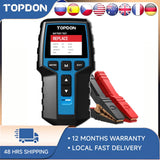 TOPDON BT200 12V Car Battery Tester Digital Automotive
$103.99Low voltage causes radio dropouts.
TOPDON BT200 12V Car Battery Tester Digital Automotive
$103.99Low voltage causes radio dropouts.
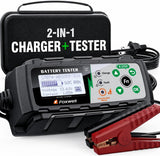 FOXWELL BC521 2-in-1 Battery Charger & Tester, Test Before
$162.35Low voltage causes radio dropouts.
FOXWELL BC521 2-in-1 Battery Charger & Tester, Test Before
$162.35Low voltage causes radio dropouts.
 FOXWELL BT705 Car Battery Tester 24V 12V, Alternator and Load
$159.89Low voltage causes radio dropouts.
FOXWELL BT705 Car Battery Tester 24V 12V, Alternator and Load
$159.89Low voltage causes radio dropouts.

Quick Reference Table
| Symptom | Likely Cause | What To Do |
|---|---|---|
| Won't pair at all | Old pairing entries or Bluetooth disabled | Delete old entries, re-pair fresh |
| Pairs but disconnects often | Phone software update or low battery | Update phone software, keep battery charged |
| Poor call/audio quality | Weak signal or outdated infotainment software | Check phone placement, update infotainment software |
| Persistent issues across attempts | Corrupted pairing memory | Clear all paired devices, re-pair from scratch |
Frequently Asked Questions
Why did Bluetooth stop working after a phone update?
Phone software updates occasionally change Bluetooth behavior or reset certain permissions, which can break a previously working pairing; removing and re-pairing the connection after an update typically resolves this.
Can too many paired devices cause problems?
Yes — having many old, unused paired devices stored in memory can sometimes cause conflicts or slow connection attempts, so periodically clearing devices you no longer use is good practice.
Does the type of phone case affect Bluetooth signal?
Certain thick cases with metal components can very slightly affect Bluetooth signal strength, though this is a minor factor compared to phone placement and software issues.
Will a factory infotainment reset fix Bluetooth issues?
It can, since it clears all paired device memory along with other settings, but it's a more drastic step — try clearing just the Bluetooth device list first before a full factory reset.
Shop the Parts Mentioned
-
 Magnetic Car Phone Holder — keeps your phone positioned near the antenna for a stronger connection.
-
 360 Rotatable Car Phone Holder — another reliable mounting option.
-
 5Core SpeedCharge Car USB-C Adapter — keeps your phone's battery up to avoid Bluetooth power-saving disconnects.