
After every oil change, you need to reset your GM vehicle's Oil Life Monitor (OLM) — otherwise the system keeps counting down from wherever it was before the change and gives you inaccurate service reminders. This is a 30-second job, but the steps vary by model year and trim level.
Here are the reset procedures for the major GM and Chevrolet vehicles, organized by generation and infotainment system.
Why the GM Oil Life Monitor Matters
GM's Oil Life Monitor is not a mileage counter. It is an algorithm that estimates oil degradation from engine revolutions, temperature, load and driving conditions, which is why short city trips trigger a change sooner than highway miles.
When you change the oil, the OLM needs to be told so it can start fresh from 100%. Skip the reset and it continues from its previous reading — telling you to change oil far sooner than necessary, or failing to alert you at all if it had not been triggered before the change.
It is worth remembering the monitor is a model, not a measurement. It does not know you towed a trailer through a mountain pass last weekend. Treat it as a ceiling rather than a target.
dexos oil
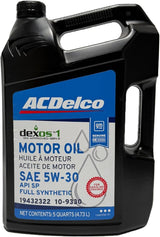 ACDelco 10-9330 dexos1 Gen 3 Full Synthetic 5W-30 Oil
$58.95dexos1 oil. Confirm viscosity. Confirm fitment by VIN before ordering.
ACDelco 10-9330 dexos1 Gen 3 Full Synthetic 5W-30 Oil
$58.95dexos1 oil. Confirm viscosity. Confirm fitment by VIN before ordering.
 GM ACDelco 109326 0W-20 dexos1 Gen 3 Full Synthetic Motor Oil
$109.99dexos1 oil. Confirm viscosity. Confirm fitment by VIN before ordering.
GM ACDelco 109326 0W-20 dexos1 Gen 3 Full Synthetic Motor Oil
$109.99dexos1 oil. Confirm viscosity. Confirm fitment by VIN before ordering.
 ACDelco 10-9246 dexos1 Gen 2 Full Synthetic 5W-30 Oil
$17.99dexos1 oil. Confirm viscosity. Confirm fitment by VIN before ordering.
ACDelco 10-9246 dexos1 Gen 2 Full Synthetic 5W-30 Oil
$17.99dexos1 oil. Confirm viscosity. Confirm fitment by VIN before ordering.


Reset Procedures by Vehicle Generation
2022–2026 Silverado, Sierra, Tahoe, Suburban, Yukon (large touchscreen)
- With the vehicle ON, tap Settings on the home screen
- Tap Vehicle
- Scroll down and tap Oil Life Reset
- Tap Reset and confirm — Oil Life returns to 100%
Alternative: use the steering wheel controls to reach the Vehicle Information menu in the cluster → scroll to Oil Life → hold OK for about 3 seconds.
2019–2021 Silverado, Sierra, Tahoe, Suburban, Yukon
- Turn ignition to ON, or start the engine
- Press HOME on the infotainment screen
- Go to Settings → Vehicle Settings
- Select Remaining Oil Life
- Press and hold Set/Reset, or tap Reset, until it returns to 100%
Steering wheel method: navigate the Driver Information Centre to Oil Life % → hold the checkmark/OK button until it resets.
2014–2018 Silverado, Sierra, Tahoe, Suburban, Yukon
With the colour cluster (most models):
- Turn ignition to ON without starting the engine
- Use the steering wheel controls to navigate the DIC to Oil Life %
- Hold Set/Reset (or press the thumbwheel) for several seconds
- Release when the DIC shows the reset confirmation or returns to 100%
Without DIC buttons (base models):
- Turn ignition to ON, engine off
- Press the trip odometer reset button three times rapidly
- Oil Life % should flash — press once more to confirm
2007–2013 Silverado, Sierra, Tahoe, Suburban, Yukon (GMT900)
- Turn ignition to the run position without starting
- Use the DIC arrows to scroll to OIL LIFE REMAINING
- Hold SET/RESET for about 3 seconds until the DIC confirms
- Turn the ignition off
Chevrolet Equinox and GMC Terrain
On models without a touchscreen reset option, the accelerator pedal method applies:
- Turn ignition to ON without starting
- Fully press the accelerator to the floor and release, three times within about five seconds
- The cluster displays a reset confirmation or returns to 100%
On touchscreen-equipped models: Settings → Vehicle → Oil Life → Reset.
Chevrolet Malibu, Impala, Camaro, Colorado and GMC Canyon
- Turn ignition to ON without starting
- Use the steering wheel arrows to navigate the DIC to Remaining Oil Life
- Hold OK or Set/Reset for several seconds until it resets
Alternative on infotainment-equipped models: Settings → Vehicle Settings → Oil Life → Reset.
Cadillac and GMC models
Cadillac models with the current interface follow the touchscreen path: Settings → Vehicle → Oil Life Reset. GMC models use the same procedure as the equivalent Chevrolet for the same generation of infotainment — the process does not differ by brand, only by system.
Oil filters
 ACDelco GM Original Equipment PF64 (25206966) Oil Filter
$13.89ACDelco filters. Confirm fitment by VIN before ordering.
ACDelco GM Original Equipment PF64 (25206966) Oil Filter
$13.89ACDelco filters. Confirm fitment by VIN before ordering.
 ACDelco PF61E Engine Oil Filter
$8.49ACDelco filters. Confirm fitment by VIN before ordering.
ACDelco PF61E Engine Oil Filter
$8.49ACDelco filters. Confirm fitment by VIN before ordering.
 ACDelco PF63 Oil Filter 19363567 2-Pack for GM 5.3L/6.2L V8
$13.89ACDelco filters. Confirm fitment by VIN before ordering.
ACDelco PF63 Oil Filter 19363567 2-Pack for GM 5.3L/6.2L V8
$13.89ACDelco filters. Confirm fitment by VIN before ordering.


A Note on Menu Paths
Menu structure varies by model year, trim and infotainment version, so if a path above does not match your vehicle, that is expected rather than a fault. The owner's manual for your exact vehicle has the correct sequence. 2019 is worth singling out — GM sold the carryover Silverado 1500 LD and Sierra 1500 Limited alongside the new-body trucks that year, and they use the earlier interface.
What If the Oil Life Won't Reset?
- Check the ignition state. Most procedures need the ignition in ON or ACC with the engine not running.
- Hold the button longer. Some vehicles need a noticeably longer hold than you would expect before the reset registers.
- Try the other method. Most GM vehicles offer both an infotainment path and a steering wheel/DIC path, and one sometimes works when the other appears not to.
- Confirm you are on the right screen. Oil Life and the trip odometer sit close together in some cluster menus, and resetting the trip is easy to mistake for success.
- If it still will not reset, have it done with a scan tool. A monitor that refuses to reset through both documented paths points at something worth diagnosing rather than working around.
Do not disconnect the battery to reset the oil life monitor. An earlier version of this page suggested it as a last resort; that was wrong. The oil life value is held in module memory and is not cleared by removing power, so the disconnection does not achieve the reset — while it does clear radio presets and driver settings, and on many GM vehicles forces module relearns that create new problems to chase.
Scan tools
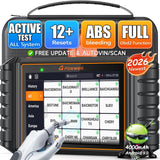 FOXWELL NT726 Bidirectional OBD2 Scanner
$368.99Reset service lights with a scan tool.
FOXWELL NT726 Bidirectional OBD2 Scanner
$368.99Reset service lights with a scan tool.
 FOXWELL NT614 Elite OBD2 Scanner
$233.69Reset service lights with a scan tool.
FOXWELL NT614 Elite OBD2 Scanner
$233.69Reset service lights with a scan tool.

How Often Does GM Recommend Changing Oil?
Change the oil when the monitor gets low, and at least once per year regardless of mileage. For most drivers on full synthetic that works out somewhere around 5,000–7,500 miles, shorter under severe use — towing, short trips, dust or extended idling.
One thing to check before your next change if you have a 6.2L L87: engines produced between 1 March 2021 and 31 May 2024 fall under a GM recall covering connecting rod and crankshaft defects, and vehicles that passed inspection and kept their original engine move from 0W-20 to a dexos R 0W-40 oil. It depends on your VIN rather than the model year. Our 6.2L maintenance guide has the full breakdown.
See also: Best Oil for the Silverado 5.3L · dexos1 vs dexosD vs dexos R · How to Change the Oil on a Silverado 1500
Air filters
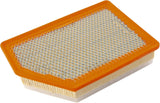 ACDelco A3459C Air Cleaner Element 85614334
$37.98Check the filters at each oil change. Confirm fitment by VIN before ordering.
ACDelco A3459C Air Cleaner Element 85614334
$37.98Check the filters at each oil change. Confirm fitment by VIN before ordering.
 ACDelco CF185 Cabin Air Filter
$28.49Check the filters at each oil change. Confirm fitment by VIN before ordering.
ACDelco CF185 Cabin Air Filter
$28.49Check the filters at each oil change. Confirm fitment by VIN before ordering.

Related GM Maintenance Guides
- Complete GM Vehicle Maintenance Schedule Guide
- The Complete GM & Chevrolet Owner's Guide
- Oil Change Maintenance Guide for GM Vehicles
— GM Service Guy
Shop Related Parts & Accessories
Confirm the viscosity your engine takes against your oil cap or VIN before ordering:
-
 ACDelco dexos1 Gen3 0W-20 Motor Oil for 5.3L/6.2L (6-qt case)
-
 ACDelco dexos1 Gen2 0W-20 Motor Oil (8-pack)
-
 ACDelco dexos1 5W-30 Full Synthetic Motor Oil (8-pack) — for engines specified 5W-30
-
 ACDelco Gold Cabin Air Filter CF1184C — confirm the part number suits your model